I have had a Nokia N9 for a few days now, and whilst it's a good phone overall, it lacks enough polish, in terms of both hardware and software, to make it a great phone.
(I won't get into a general review of the phone, for there has been many written about it: see here at Engadget, or here at Gizmodo Australia.)
I wanted to test it since it was released to the public; its 'predecessor', the venerable Nokia N900, has been a trusty companion for some years, up until the varnish on the screen began to peel off, forcing me to find a replacement. Since then I use an iPhone 4S, working in conjunction with the MacBook Air and other devices.
The reason I bought it is 1. I finally got paid, and 2. Amazon.de, the German Amazon store, sells it for what amounts to about $375, compared to the $655 it would have cost me on Amazon.fr. But honestly, I just wanted to test that device.
Hardware side, my grief lies mostly in the touch screen. Waking up the phone, apart from pushing the side button (there are no buttons on the front of the phone), takes a quick double-tap on the screen, that often wouldn't wake up the phone, making me do it twice or three times to unlock the screen. Once unlocked, the swipe gesture works well, from the applications screen to the open windows to the notifications and feed page.
Now I don't know if I should classify this as a hardware or a software bug, so I'll leave it here : I commute to work by bus, every morning. It's not a long ride: I live
about 30 minutes away from work, of which about 15 are spent in said bus
(depending, of course, of the traffic). During these 15 minutes, I like
to check my (e)mail, read the news, have a look at the New York Times
front page or consult the excellent NextDraft, written by Dave Pell. On my first bus trip with the new phone, it refused to update my mailboxes. I don't know why, I really don't know. The network indicators were not reporting any problem, the phone seemed to be connected in 3.5G (HSDPA), and able to exchange information with the mobile network. I had to reboot.
I wouldn't have thought more of it, but it happened just the day after, in the middle of the day, at the office. I don't work in a Second World War bunker, nor do I work in a cave, so the reception was, again, very good. I rebooted, to find that the battery was nearly depleted. Good thing it has a micro-USB port, contrary to *ahem* the iPhone.
Software-side, what I really like about the phone is that Nokia tried to capitalize on the development of the previous OS, Maemo, later merged with the MeeGo platform. The history of these two OS are worth a read, Intel, Samsung and Nokia having done great work on the user interface and user experience. The 'MeeGo feel' is all over the Nokia N9 and its rounded windows, icons and fonts, culminating in what Nokia calls the 'swipe' interface. It works really well. I found a general responsiveness in most of the UI, which is worth considering in spite of the 1Ghz ARM Cortex A8 system-on-chip used, and contrary to the ever-laggy (in my opinion) Android-powered phones and their multiple core architecture.
I love (as in the N900) the tight integration across the device of multiple accounts, from SIP to Facebook, Twitter, Skype, or the Google Accounts. Once configured in the 'Accounts' application, the phone application can dial directly via the operator or via SIP, for example. Same for the Google accounts : once configured, you have the option to also sync your Google Calendar to the main calendar application, etc.
The user also has the choice of having the contacts of each service appear
in the main contact application, thus allowing Skype calls from the
main phone application. Now I'd like to see that on the iPhone, forcing the use of third-party software (namely Linphone) to use a SIP account.
You can really configure to your liking the 'feed', appearing under the notifications screen. It can show content from the accounts you set up.
Now for the software bugs that plagued my experience. First of all, I had to reboot, once, after having inserted my SIM-card. The phone refused to detect any phone network before that. The iPhone stays on all the time, allowing a hotswap of the SIM card. I would have been ok with it (after all, I don't swap SIM cards that often), but it happened to me twice in the next two days. Finding that you hadn't received a call because the phone decided to disconnect from the network should not be part of any user experience.
Another strange software bug : someone left me a voice message, the other day. In the notification screen, a little icon appeared, showing a message with the 'tape' icon. Well, it didn't go away once I called my message center and heard the message. And the 'clear' option that appears when you have notifications was grayed, so that notification stayed on the home screen too. Bad, bad, bad.
All in all, the real question is not when or if the phone will be ready for prime time: it has not been designed to. It has been designed to appeal to the geek crowd, but it even fails that promise. Maybe some other software developments will help: I was very surprised, and in a good way, by what the folks at Jolla are doing with their Sailfish OS. See this Engadget article, where they do a 'hands-on' with the OS, to see pictures and watch a video on the project.
They are building their OS upon Mer, itself a fork of MeeGo ("If you're wondering why the mobile OS is usually shown running on Nokia's N950 developer handset, that's because Jolla employs many ex-MeeGo engineers, so the OMAP-based phone was a natural fit", the article says).
I tried Mer (well specifically Plasma Active, built on it) on the famous WeTab, and was really pleased with that incarnation of Mer / MeeGo. So I look forward to be able to try the Jolla Sailfish OS on the N9. Or, for that matter, the Firefox OS being built by the Mozilla Foundation!
Tuesday, January 15, 2013

Wednesday, September 5, 2012
Java 7u7 and OS X 10.8 Mountain Lion
Yesterday I had the most bizarre bug since I installed Mountain Lion (OS X 10.8). I find it perfect, much more than Lion (10.7), but, as I was saying, yesterday was strange. I had to use a Java Applet, in order to fill in notes for students. Nowadays, everyone is arguing about why and how you should uninstall Java, either from your system or from Firefox or whichever browser you are using.
Well, seeing the recent bugs discovered in Java 6u35, I decided to upgrade to Java 7u7, not an official upgrade from Apple but nevertheless an update found on Oracle's website. Once I installed it, proud and happy, I went to the university, and found out that nothing was working with the applet I should have used to fill in notes. I had a computer available in an office at the university, running an old Windows XP with Firefox 3.6.16. At least it worked, but I wanted to dig a little deeper anyway.
First, I noticed that none of my previous application requiring Java (say, jTagger or jDownloader) were working, but I didn't had the slightest idea if it was caused by the update or by me trying to uninstall Java. Turns out it was the update, and that neither application was compatible with Java 7. Fortunately, I had another computer lying around (the tests were made on my Macbook Air [in French], and I hadn't made the Java update on my Macbook Pro, which was suffering another bug but I'll talk about it later), and this computer ran the software cited just fine.
Just to be clear : the Java Preferences utility is very fine, and I was able to get jTagger and jDownloader running on the Macbook Air in no time, save for a reboot after choosing "Java SE 6 - 64-bit" in the utility. I could even, in case something with the old Java installation went very wrong, install the older Java 6u35 available from Apple.
But Firefox kept hanging on the Java Applet, the Java plugin for Firefox having been updated with the Java 7 update. So I zipped-up the JavaAppletPlugin.plugin from /Library/Internet Plug-Ins/ on the Macbook Pro, and transferred it to the Macbook Air to replace the newer one.
Everything worked fine from here. If you need this (older) plugin, download it here, it might save you time from wondering what went wrong. Uncompress it in /System/Library/Java/Support/CoreDeploy.bundle/Contents/ and place a link for it in /Library/Internet Plug-Ins/.
Well, seeing the recent bugs discovered in Java 6u35, I decided to upgrade to Java 7u7, not an official upgrade from Apple but nevertheless an update found on Oracle's website. Once I installed it, proud and happy, I went to the university, and found out that nothing was working with the applet I should have used to fill in notes. I had a computer available in an office at the university, running an old Windows XP with Firefox 3.6.16. At least it worked, but I wanted to dig a little deeper anyway.
First, I noticed that none of my previous application requiring Java (say, jTagger or jDownloader) were working, but I didn't had the slightest idea if it was caused by the update or by me trying to uninstall Java. Turns out it was the update, and that neither application was compatible with Java 7. Fortunately, I had another computer lying around (the tests were made on my Macbook Air [in French], and I hadn't made the Java update on my Macbook Pro, which was suffering another bug but I'll talk about it later), and this computer ran the software cited just fine.
Just to be clear : the Java Preferences utility is very fine, and I was able to get jTagger and jDownloader running on the Macbook Air in no time, save for a reboot after choosing "Java SE 6 - 64-bit" in the utility. I could even, in case something with the old Java installation went very wrong, install the older Java 6u35 available from Apple.
But Firefox kept hanging on the Java Applet, the Java plugin for Firefox having been updated with the Java 7 update. So I zipped-up the JavaAppletPlugin.plugin from /Library/Internet Plug-Ins/ on the Macbook Pro, and transferred it to the Macbook Air to replace the newer one.
Everything worked fine from here. If you need this (older) plugin, download it here, it might save you time from wondering what went wrong. Uncompress it in /System/Library/Java/Support/CoreDeploy.bundle/Contents/ and place a link for it in /Library/Internet Plug-Ins/.
Thursday, August 23, 2012
Comment manger une pastèque
C'est l'été, il fait chaud, vous avez envie de manger des fruits et de boire parce qu'il fait chaud.
Alors vous achetez une pastèque. Le meilleur moyen de la manger ? Tom Willett vous l'explique, en vidéo.
Hint: C'est à la petite cuillère. Une demi-pastèque par personne (oui oui).
Hint: C'est à la petite cuillère. Une demi-pastèque par personne (oui oui).
Tuesday, July 31, 2012
Mise à jour : OSX 10.8 + MacBook Air
Hop, je passe rapidement, pour vous signaler quelques mises à jour concernant mon précédent article sur le MacBook Air.
(TL;DR : Je suis très très heureux du MacBook Air + OSX 10.8.)
En effet, j'ai fait hier au soir la mise à jour (pour 15.99e.) de Lion, 10.7, vers Mountain Lion, 10.8.
Je ne vous ferai pas l'honneur de faire un récapitulatif complet des changements entre les deux versions, d'autres gens s'en chargent bien mieux que je ne pourrai le faire (et en 26.000 signes, s'il vous plaît). En revanche, voici quelques points qui modifient ma vision des choses, notamment par rapport aux griefs que j'avais contre Lion.
Avec Mountain Lion, Apple prépare les utilisateurs de Macs à passer au clown. Chaque application peut enregistrer des documents dans un dossier en ligne (en vérité un dossier peu caché, ~/Library/Mobile Documents/), un peu à la manière de Dropbox mais dans la volonté de rendre transparente la synchronisation. Si je ne suis pas un partisan du cloud, j'ai pourtant apprécié que l'option soit disponible, et surtout qu'elle n'est ni obligatoire ni réinitialisée à chaque lancement d'application (TextEdit.app, par exemple, se souvent de votre dernier choix, création d'un document en local ou dans le cloud).
D'autres changements sont bienvenus, et parfois peu visibles à première vue.
L'application de calendrier et celle de gestion des courriels, toutes deux à forte tendance skeuomorphe, se sont ainsi vu retirer les fioritures dont je me plaignais lors de ma revue lorsque les événements sont déclenchés par un raccourci clavier. Un + shift + D enverra le mail sans animation, de même qu'un + gauche ou + droite changera de mois dans le calendrier sans animation de feuille qui se tourne. Lorsque cet événement est déclenché au trackpad (mouvement de deux doigts vers la gauche ou la droite), l'animation a été conservée.
L'indicateur de batterie, par exemple, ainsi que l'horloge du menu ont tous les deux vu leur marge gauche et droite augmentée de quelques pixels (de l'ordre de deux ou trois). Assez peu pour que cela saute aux yeux, mais juste assez pour les rendre encore un peu plus visibles.
Le centre de notifications, qui s'allie parfaitement à Growl (à ce sujet, j'ai dû revenir à une version antérieure de Growl : celle de l'App Store, pourtant payante, freezait régulièrement Echofon.app (pour Twitter), avec processeurs à 100% d'utilisations et donc ventilateurs bruyants, etc), permet de pallier au manque de visibilité des courriels reçus dont je parlais en février dernier.
Le logiciel Software Update, disponible dans le « menu Pomme » — et qui lançait jusque-là sa propre application — a été intégré à l'App Store de manière transparente. Dorénavant une recherche de mises à jour dans l'App Store affichera à la fois les mises à jour d'applications achetées par ce biais, mais aussi les mises à jour système (ce qui se comprend, car Mountain Lion est bien vendu et téléchargé sur l'App Store comme une autre application).
Plus globalement, c'est une cohérence de l'ensemble qui est — enfin ? — mise en place, à travers notamment un nouvel iChat, renommé Messages, qui permet de recevoir les textos envoyés entre iPhone (les fameux iMessages). Que les utilisateurs de l'ancien iChat (comme moi) ne s'en fasse pas trop : en un clic, l'ancienne interface est de retour, avec la fenêtre des « Buddies » à la MSN / Pidgin / Adium / GTalk. Si le GateKeeper, qui empêche par défaut les applications tierces non signées de s'installer, a bien été mis en place, il est facilement désactivable pour les utilisateurs avancés.
Il en va de même pour la plupart des nouvelles options ou des nouveaux changements de l'interface graphique : dans la plupart des cas Apple a prévu une option pour désactiver la nouvelle interface. Il est à noter que si une configuration particulière avait déjà été mise en place (par exemple pour l'affichage des courriels dans Mail.app), elle est conservée.
Enfin, le problème des fioritures dans l'interface, qui n'apparaissent plus lors de l'utilisation des raccourcis clavier (qualifiant à mon avis un « utilisateur avancé ») participe aussi de cette cohérence d'ensemble. On montre aux nouveaux arrivants les possibilités des logiciels tout en leur permettant de comprendre que non, l'informatique, ça n'est pas si compliqué, tout en valorisant les utilisateurs avancés qui n'ont souvent, à mon avis, rien à faire de tels effets graphiques.
(TL;DR : Je suis très très heureux du MacBook Air + OSX 10.8.)
En effet, j'ai fait hier au soir la mise à jour (pour 15.99e.) de Lion, 10.7, vers Mountain Lion, 10.8.
Je ne vous ferai pas l'honneur de faire un récapitulatif complet des changements entre les deux versions, d'autres gens s'en chargent bien mieux que je ne pourrai le faire (et en 26.000 signes, s'il vous plaît). En revanche, voici quelques points qui modifient ma vision des choses, notamment par rapport aux griefs que j'avais contre Lion.
Avec Mountain Lion, Apple prépare les utilisateurs de Macs à passer au clown. Chaque application peut enregistrer des documents dans un dossier en ligne (en vérité un dossier peu caché, ~/Library/Mobile Documents/), un peu à la manière de Dropbox mais dans la volonté de rendre transparente la synchronisation. Si je ne suis pas un partisan du cloud, j'ai pourtant apprécié que l'option soit disponible, et surtout qu'elle n'est ni obligatoire ni réinitialisée à chaque lancement d'application (TextEdit.app, par exemple, se souvent de votre dernier choix, création d'un document en local ou dans le cloud).
D'autres changements sont bienvenus, et parfois peu visibles à première vue.
L'application de calendrier et celle de gestion des courriels, toutes deux à forte tendance skeuomorphe, se sont ainsi vu retirer les fioritures dont je me plaignais lors de ma revue lorsque les événements sont déclenchés par un raccourci clavier. Un + shift + D enverra le mail sans animation, de même qu'un + gauche ou + droite changera de mois dans le calendrier sans animation de feuille qui se tourne. Lorsque cet événement est déclenché au trackpad (mouvement de deux doigts vers la gauche ou la droite), l'animation a été conservée.
L'indicateur de batterie, par exemple, ainsi que l'horloge du menu ont tous les deux vu leur marge gauche et droite augmentée de quelques pixels (de l'ordre de deux ou trois). Assez peu pour que cela saute aux yeux, mais juste assez pour les rendre encore un peu plus visibles.
Le centre de notifications, qui s'allie parfaitement à Growl (à ce sujet, j'ai dû revenir à une version antérieure de Growl : celle de l'App Store, pourtant payante, freezait régulièrement Echofon.app (pour Twitter), avec processeurs à 100% d'utilisations et donc ventilateurs bruyants, etc), permet de pallier au manque de visibilité des courriels reçus dont je parlais en février dernier.
Le logiciel Software Update, disponible dans le « menu Pomme » — et qui lançait jusque-là sa propre application — a été intégré à l'App Store de manière transparente. Dorénavant une recherche de mises à jour dans l'App Store affichera à la fois les mises à jour d'applications achetées par ce biais, mais aussi les mises à jour système (ce qui se comprend, car Mountain Lion est bien vendu et téléchargé sur l'App Store comme une autre application).
Plus globalement, c'est une cohérence de l'ensemble qui est — enfin ? — mise en place, à travers notamment un nouvel iChat, renommé Messages, qui permet de recevoir les textos envoyés entre iPhone (les fameux iMessages). Que les utilisateurs de l'ancien iChat (comme moi) ne s'en fasse pas trop : en un clic, l'ancienne interface est de retour, avec la fenêtre des « Buddies » à la MSN / Pidgin / Adium / GTalk. Si le GateKeeper, qui empêche par défaut les applications tierces non signées de s'installer, a bien été mis en place, il est facilement désactivable pour les utilisateurs avancés.
Il en va de même pour la plupart des nouvelles options ou des nouveaux changements de l'interface graphique : dans la plupart des cas Apple a prévu une option pour désactiver la nouvelle interface. Il est à noter que si une configuration particulière avait déjà été mise en place (par exemple pour l'affichage des courriels dans Mail.app), elle est conservée.
Enfin, le problème des fioritures dans l'interface, qui n'apparaissent plus lors de l'utilisation des raccourcis clavier (qualifiant à mon avis un « utilisateur avancé ») participe aussi de cette cohérence d'ensemble. On montre aux nouveaux arrivants les possibilités des logiciels tout en leur permettant de comprendre que non, l'informatique, ça n'est pas si compliqué, tout en valorisant les utilisateurs avancés qui n'ont souvent, à mon avis, rien à faire de tels effets graphiques.
Sunday, July 8, 2012
Les zombies à l'UQAM, c'est fini
Et qu'est-ce que c'était bon !
Pour ceux qui n'étaient pas au courant, depuis mercredi dernier et jusque hier soir, samedi, un important colloque se déroulait à l'Université du Québec à Montréal : le tout premier colloque international sur les zombies, « Invasion Montréal ».
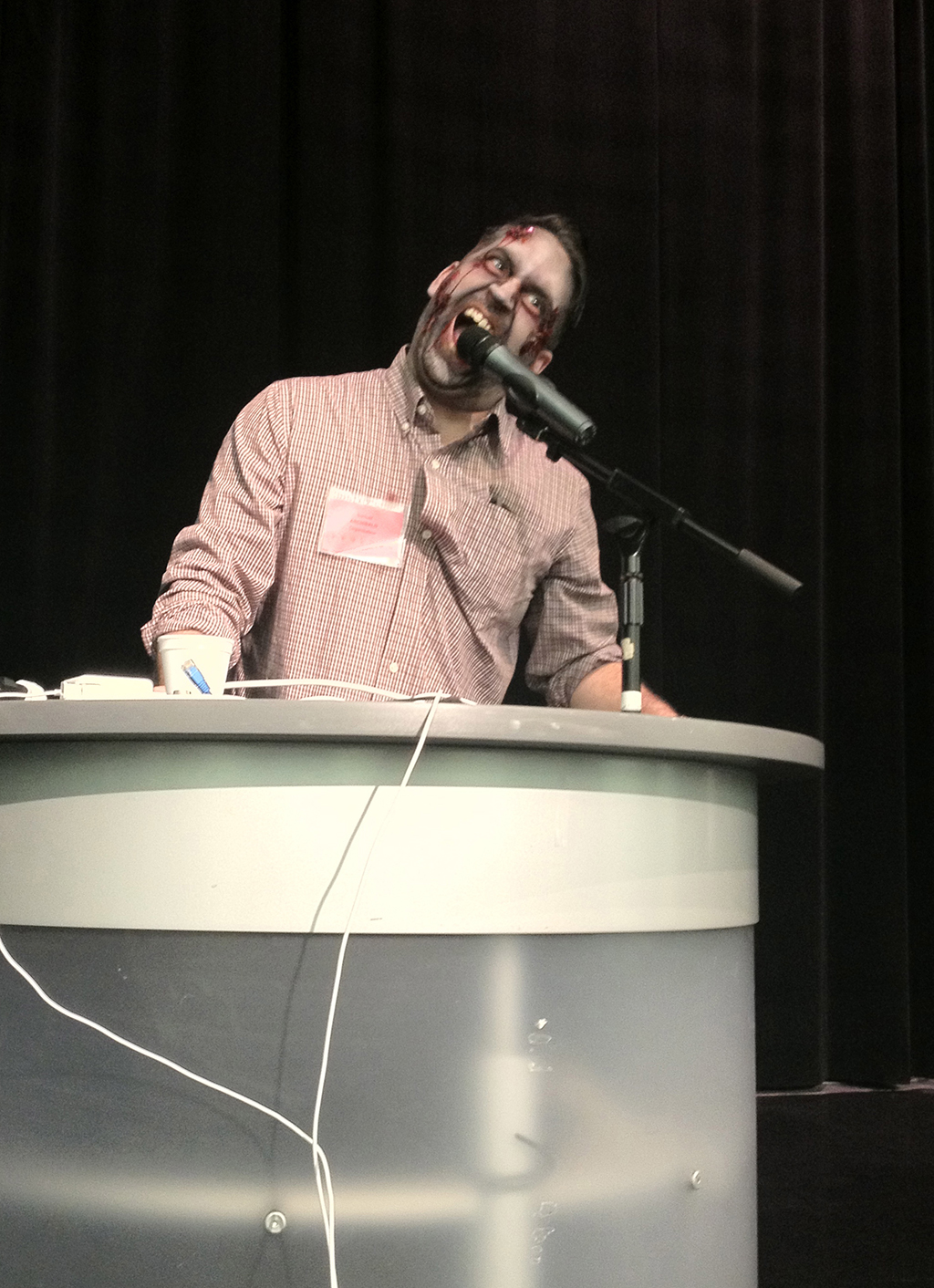
Samuel Archibald, organisateur-présentateur-zombie au micro lors de la mini-zombie walk du jeudi 5
Le colloque, organisé par Samuel Archibald, de Université du Québec à Montréal, Antonio Dominguez Leiva, de l'Université du Québec à Montréal, Barry Keith Grant, de la Brock University, Tanya Krzywinska, de la Brunel University West London, Denis Mellier, de l'Université de Poitiers, Shawn McIntosh, de la Columbia University et Bernard Perron, de l'Université de Montréal, a été officiellement lancé jeudi 5.
Il a toutefois été précédé d'une soirée spéciale à la cinémathèque québécoise avec la présentation de Nightmare City (ou Incubo sulla città contaminata, Lenzi, 1980) et Revenge of the Dead (ou Zeder, Amati, 1983).
Au cours de ces trois jours de colloque, des spécialistes de cinéma, jeu vidéo, bande dessinée, littérature et philosophie ont évoqué les diverses incarnations des zombies, depuis les films bien connus de George A. Romero jusqu'à la littérature pseudo-zombie récente (Pride and Prejudice and Zombies, de Jane Austen et Seth Grahame-Smith, mais surtout remis au goût du jour par les deux ouvrages de Max Brooks (oui, le fils de), The Zombie Survival Guide et World War Z.), en passant par ce qui a annoncé le retour de la figure du zombie dans la culture populaire : les jeux vidéo, et notamment la série des Biohazard / Resident Evil.
Liberation.fr commentait, dès mercredi 4 :
« Né des craintes associées à la fin de l’empire américain, dans les années 70, le zombie incarne aujourd’hui une paranoïa universelle : la peur d’assister à la fin de la société, la phobie d’une épidémie mondiale, du retour à la barbarie et la méfiance généralisée envers les institutions. »
« Bien entendu, nous toucherons le zombie cinématographique, mais aussi à sa signification sociale et politique. La sexualité du mort-vivant de même que son aspect plus philosophique, son ontologie, seront de la discussion », annonçait Bernard Perron, un des organisateurs, au média Canoë.ca.
Enfin, pour finir en beauté, le Huffington Post Québec s'est fendu d'une belle galerie de photos, réalisée lors d'une mini-zombie walk le jeudi 5 au soir. Le journal en ligne relie le colloque aux affaires récentes ayant donné naissance à des rumeurs d'invasion zombie :
« Le colloque Invasion Montréal se déroule alors que plusieurs histoires de cannibalisme aux États-Unis et en Chine ont fait la manchette récemment.
À Miami, un homme a dévoré le visage d'un sans-abri aux abords d'une autoroute le 26 mai dernier. Quelques jours plus tard, un homme de Baltimore a avoué avoir mangé le coeur de son coloc. En Chine, le 26 juin dernier, un chauffeur d'autobus aurait mangé le nez et les lèvres d'une femme au volant de sa voiture.
Ces incidents troublants ont forcé le Center for disease control and prevention (CDC) aux États-Unis à démentir l'apparition d'une épidémie de zombies. Le CDC a affirmé n'avoir identifié “aucun virus ni maladie qui ramènerait les morts à la vie, ou qui présenterait des symptômes similaires aux zombies”. »
Si l'on a pu déplorer un manque d'analyse formelle (plan, espace, temps) du film de zombie, c'était toutefois un colloque qui — je l'espère — marquera par son thème les études universitaires.
En plus des actes de colloque, qui paraîtront bientôt en format papier et en format numérique (sur Pop en Stock, le « Bazar d'études sur la culture populaire contemporaine » de Samuel Archibald et d'Antonio Dominguez Leiva), vous pouvez consulter quelques notes (et photos...) prises au cours de ce colloque sur twitter, grâce aux hashtags #InvasionMtl et #InvasionMontreal.
À titre personnel, je remercie encore Samuel Archibald pour son accueil et le fait qu'il ait bien voulu m'accepter parmi les « zombies bénévoles » pour la durée du colloque, ainsi que tous les organisateurs, conférenciers et participants pour l'excellent colloque, qui fera date je n'en doute pas.
Wednesday, September 28, 2011
After some tests...
OK, so, I quite fell in love with MeeGo 1.2. Unfortunately, their "Tablet" OS isn't ready for mainstream. Some things fail, some thing just don't work at all, but man do they have an understanding of what we (and by we, I mean I) want! Like Maemo before, they did a really good job at inventing new ways to interact with the device, of using screen estate, etc.
Anyway, I also wanted to try things (Ubuntu, Jolicloud (or JoliOS, as they made Jolicloud an online service, accessible via the browser).
So, Ubuntu went fine, but for some reason I wasn't able to access the BIOS while booting from any stick except the one with the recovery image dd'ed on it. Once I made changes in the BIOS (no quiet boot, try USB first) then I've been able to launch and install Ubuntu, fiddle with it, and reboot and install Jolicloud (/dev/sda1 swap (2Go), /dev/sda5 Ubuntu (6.5Go), /dev/sda6 JoliOS (6.5Go)). I already had a configured JoliOS account, so it installed automagically all my previous applications (VLC, OpenOffice etc.)
I disabled the installation of a boot loader with JoliOS, as I knew GRUB 2, installed by Ubuntu, would do the job. It did very well, a simple 'update-grub' picked up the newly installed JoliOS partition, and added it to the boot menu. It should be noted that on GRUB 2, the selection is done via the 'soft button' (near the blue led) of the WeTab; an USB keyboard will not be recognized (it hasn't been, in my tests).
I installed florence in Ubuntu, a virtual on-screen keyboard that works quite well. It might be a little small, but it's resizable, and customizable. All in all, a good choice.
I wasn't quite satisfied with JoliOS: by default, there's no on-screen keyboard installed, and the buttons are really small (Unity in Ubuntu does a great job for this). So, I formatted /dev/sda6 to reinstall MeeGo 1.2, found here. You'll find a downloadable .img of MeeGo, version 1.2.0.90, built May 17, 2011. Another version can be found here, built July 26, 2011, but I haven't tried it.
Besides, Intel dropped MeeGo today, to found Tizen. Tizen should be approximately the same thing, under another name. A first release should be made available Q1 2011.
So, what about you? What is / are your favorite(s) OS(s) on the WeTab, so far?
Anyway, I also wanted to try things (Ubuntu, Jolicloud (or JoliOS, as they made Jolicloud an online service, accessible via the browser).
So, Ubuntu went fine, but for some reason I wasn't able to access the BIOS while booting from any stick except the one with the recovery image dd'ed on it. Once I made changes in the BIOS (no quiet boot, try USB first) then I've been able to launch and install Ubuntu, fiddle with it, and reboot and install Jolicloud (/dev/sda1 swap (2Go), /dev/sda5 Ubuntu (6.5Go), /dev/sda6 JoliOS (6.5Go)). I already had a configured JoliOS account, so it installed automagically all my previous applications (VLC, OpenOffice etc.)
I disabled the installation of a boot loader with JoliOS, as I knew GRUB 2, installed by Ubuntu, would do the job. It did very well, a simple 'update-grub' picked up the newly installed JoliOS partition, and added it to the boot menu. It should be noted that on GRUB 2, the selection is done via the 'soft button' (near the blue led) of the WeTab; an USB keyboard will not be recognized (it hasn't been, in my tests).
I installed florence in Ubuntu, a virtual on-screen keyboard that works quite well. It might be a little small, but it's resizable, and customizable. All in all, a good choice.
I wasn't quite satisfied with JoliOS: by default, there's no on-screen keyboard installed, and the buttons are really small (Unity in Ubuntu does a great job for this). So, I formatted /dev/sda6 to reinstall MeeGo 1.2, found here. You'll find a downloadable .img of MeeGo, version 1.2.0.90, built May 17, 2011. Another version can be found here, built July 26, 2011, but I haven't tried it.
Besides, Intel dropped MeeGo today, to found Tizen. Tizen should be approximately the same thing, under another name. A first release should be made available Q1 2011.
So, what about you? What is / are your favorite(s) OS(s) on the WeTab, so far?
Friday, June 17, 2011
Looking forward to try MeeGo 1.2
Sorry, I haven't posted here in a while.
I've gone back to the WeTab OS, I don't quite remember why, maybe just to try the WeTab Recovery Image. It works well, except that it doesn't care about your other partitions or anything. Everything is wiped, so be aware.
Anyway, if I have time this week-end I'll try the new MeeGo 1.2 "Tablet" Developer Preview. I'm really looking forward to this, I've got a lot of faith in MeeGo. I'll try one day or the other to put it on my N900, that should be fun to try too.
Anyway, I'll put my thoughts about MeeGo 1.2 here as soon as possible. Stay tuned!
I've gone back to the WeTab OS, I don't quite remember why, maybe just to try the WeTab Recovery Image. It works well, except that it doesn't care about your other partitions or anything. Everything is wiped, so be aware.
Anyway, if I have time this week-end I'll try the new MeeGo 1.2 "Tablet" Developer Preview. I'm really looking forward to this, I've got a lot of faith in MeeGo. I'll try one day or the other to put it on my N900, that should be fun to try too.
Anyway, I'll put my thoughts about MeeGo 1.2 here as soon as possible. Stay tuned!
Subscribe to:
Comments (Atom)